Q4 Won't Wait: Build Your Holiday Ad Creative From Proven Winners, Starting Now
The teams that win the holidays treat creative as a supply problem they solve in September. Here's how to build your Q4 ad bench from proven template winners — using real ROAS, plays and ad-spend data already inside CreativeFly Marketing Studio.

Most merchants treat Q4 creative like a sprint they start in late October. They brief editors the week before Black Friday, ship a handful of ads, and pray something breaks through before the auction prices them out. Then they watch their best-performing concepts fatigue in a week and scramble to replace them with nothing but a blank prompt box and a bad feeling.
The teams that win the holidays do the opposite. They treat Q4 creative as a supply problem they solve in September — and they solve it by stealing from proven winners instead of inventing from scratch.
Here's the practical playbook for building your holiday ad bench right now, using the real campaign data already sitting inside CreativeFly Marketing Studio.
The Q4 math is a creative-supply problem, not a budget problem
You can outspend a competitor for a few days. You can't outspend creative fatigue. Every holiday concept has a shelf life: it peaks, the same faces and hooks saturate the feed, frequency climbs, and ROAS drifts down while your CPMs go up because everyone else is bidding on the same season.
That means the winning move isn't "make one great holiday ad." It's "have enough proven variants in the chamber to rotate before any single one burns out." Volume and iteration speed beat a single hero concept every time in Q4 — and iteration speed is exactly what a template-plus-remake workflow gives you.
The good news: you don't have to guess which holiday concepts hold up. Last year's winners are already catalogued, ranked, and one click from a remake.
Start by mining last year's winners — the data is already in the app
Open Marketing Studio and go to the template library. Set Source = PGC, search "Christmas", and sort by ROAS. You're immediately looking at real, money-tested holiday concepts — not mood boards, not stock footage, but ads that actually spent and returned.
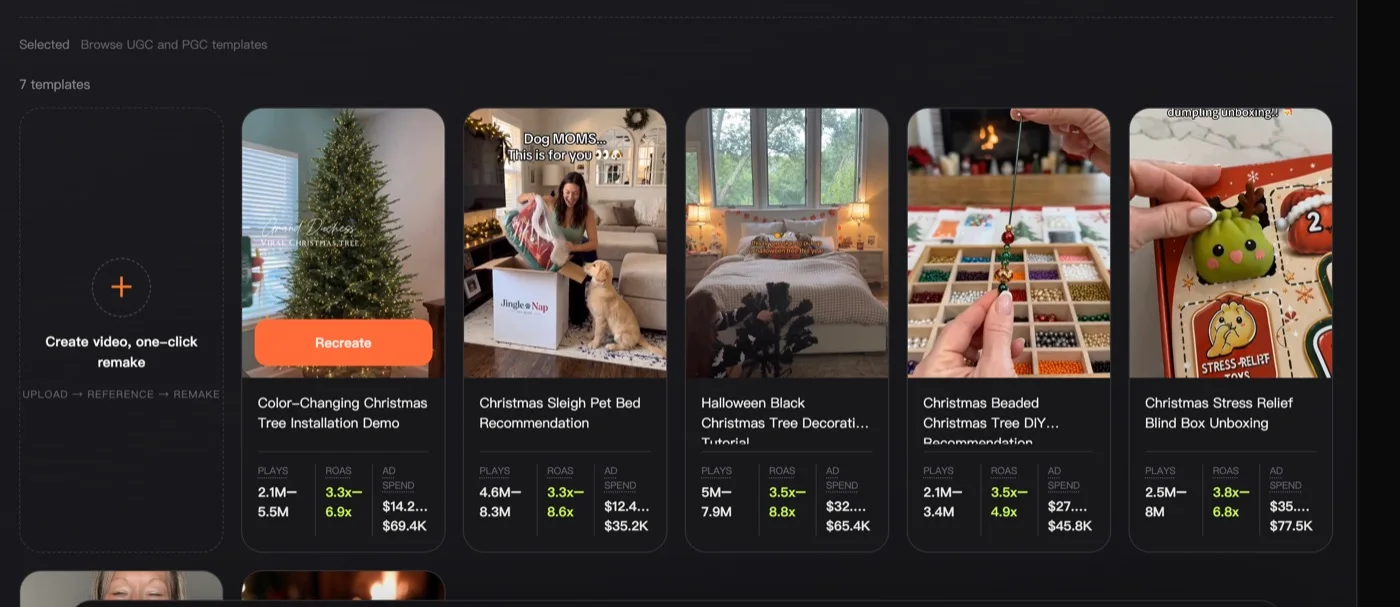
A few things jump out when you read the cards:
- Color-Changing Christmas Tree Installation Demo — 2.1M–5.5M plays, 3.3x–6.9x ROAS, $14.2K–$69.4K ad spend.
- Christmas Sleigh Pet Bed Recommendation — 4.6M–8.3M plays, 3.3x–8.6x ROAS, $12.4K–$35.2K spend.
- Halloween Black Christmas Tree Decoration Tutorial — 5M–7.9M plays, 3.5x–8.8x ROAS, $32K–$65.4K spend.
- Christmas Beaded Christmas Tree DIY Recommendation — 2.1M–3.4M plays, 3.5x–4.9x ROAS, $27K–$45.8K spend.
- Christmas Stress Relief Blind Box Unboxing — 2.5M–8M plays, 3.8x–6.8x ROAS, $35K–$77.5K spend.
Every one of these is a structure you can borrow: the "installation demo" reveal, the "creator recommendation" POV, the "DIY tutorial" hook, the "unboxing" beat. The product doesn't have to be a Christmas tree — the reason these cleared 3x+ ROAS is the shape of the story, not the SKU. Swap in your product, keep the skeleton.
Notice the pattern in the hooks that survive: recommendation and tutorial formats dominate. People don't want to be sold to in the feed during the holidays; they want a friend showing them a find or walking them through a gift idea. Build your bench around those two frames.
Widen the bench: Halloween is the volume season, not just a warm-up
Don't sleep on Halloween as its own revenue window — and don't treat it as separate from Christmas. The seasonal audiences overlap, the creative formats cross over, and the sheer number of proven concepts is bigger than most people expect.
Search "Halloween" with Source = PGC and you get 31 high-performing templates to pull from — more than four times the Christmas PGC set.
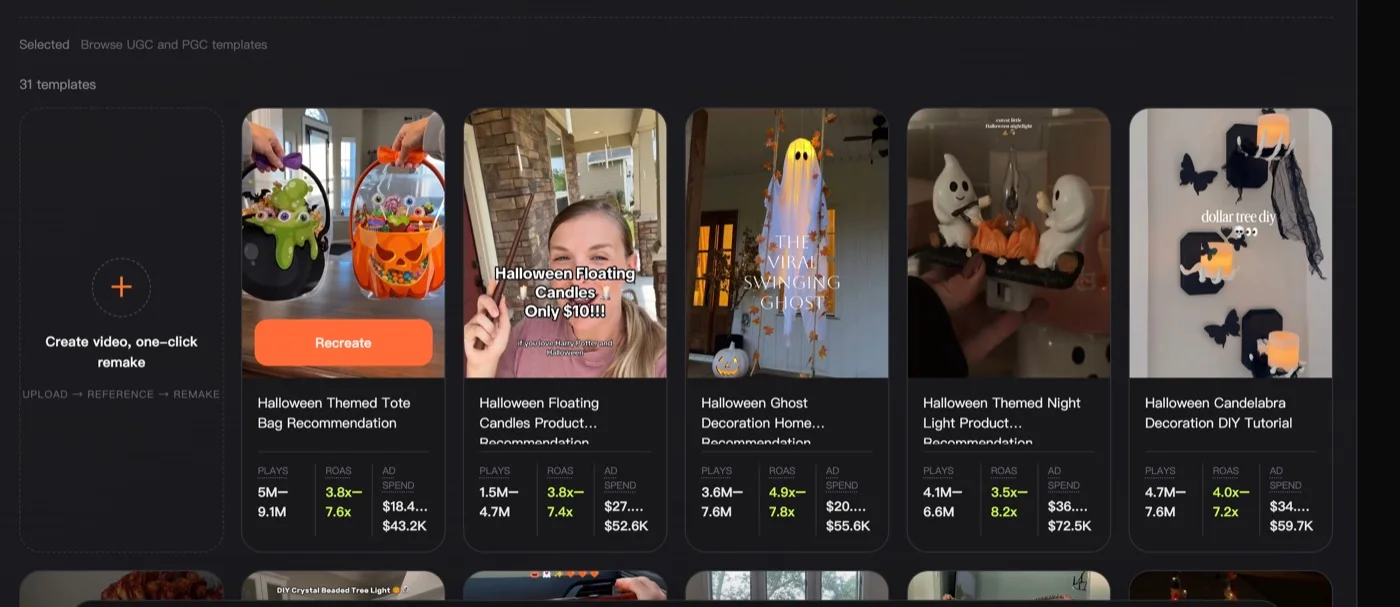
The Halloween cards run hot:
- Halloween Themed Tote Bag Recommendation — 5M–9.1M plays, 3.8x–7.6x ROAS, $18.4K–$43.2K spend.
- Halloween Floating Candles Product Recommendation — 1.5M–4.7M plays, 3.8x–7.4x ROAS, $27K–$52.6K spend.
- Halloween Ghost Decoration Home Recommendation — 3.6M–7.6M plays, 4.9x–7.8x ROAS, $20K–$55.6K spend.
- Halloween Themed Night Light Product Recommendation — 4.1M–6.6M plays, 3.5x–8.2x ROAS, $36K–$72.5K spend.
- Halloween Candelabra Decoration DIY Tutorial — 4.7M–7.6M plays, 4.0x–7.2x ROAS, $34K–$59.7K spend.
The "floating candles" and "swinging ghost" concepts are pure spectacle hooks — they stop the scroll on an effect, not a pitch. That's a reusable trick for Q4: lead with something visually impossible, then land the product.
Zoom out and the seasonal bench is deep. Across the library you've got 3,103 total templates and 727 PGC concepts to draw from. Season by season: Halloween 123 templates (31 PGC), Christmas 118 (7 PGC), plus adjacent angles like gift (64) and advent calendar (34). That's enough proven structure to build a rotation for every product in your catalog without ever staring at a blank prompt.
One more sort worth learning: switch to Longest running. Ads that survived a long flight are the ones that resisted fatigue — the safest possible bets to model your Q4 variants on.
Turn a winner into your ad with one-click remake
Finding a concept is half the job. Shipping it as your own ad is where most tools leave you hanging. In Marketing Studio, every winner card has a Recreate action that drops you straight into the generate screen with the template's structure already loaded.
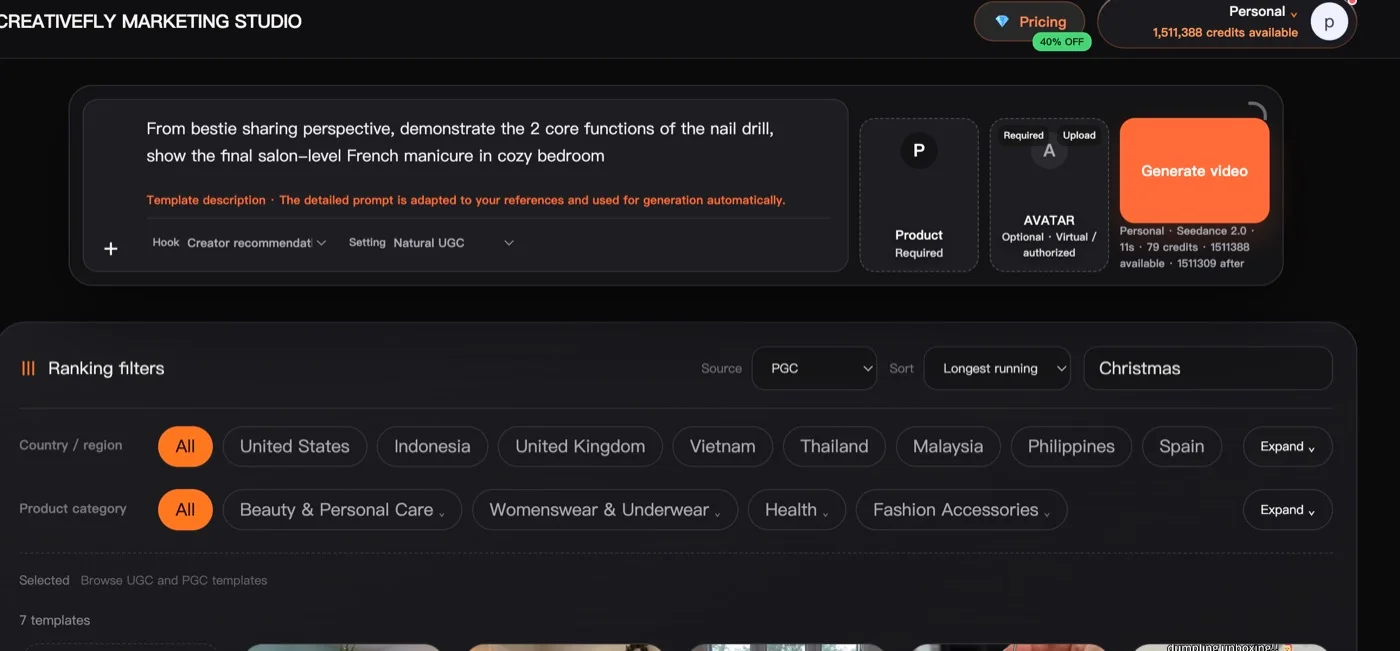
Here's what's happening under the hood, and why it matters for Q4 speed:
- The template's detailed prompt is adapted to your references and used for generation automatically — you're not rewriting the winning structure from memory, you're inheriting it.
- You drop in your Product (required) and optionally an Avatar from the virtual-authorized library, then hit Generate video.
- Output is Seedance 2.0, an 11-second clip for roughly 79 credits. That's the cost of a variant. When a single test costs you ~79 credits instead of a $500 editor invoice, you can afford to make ten angles and let the auction pick the winner — which is the entire point of a Q4 creative bench.
- Before you even generate, the Ranking filters let you match the concept to your market: filter by Country / region (United States, United Kingdom, Indonesia, Vietnam, Thailand, Malaysia, Philippines, Spain…) and Product category (Beauty & Personal Care, Womenswear, Health, Fashion Accessories…). Pick the winners that already worked in the markets and categories you actually sell into.
That last part is the quiet superpower. You're not betting a holiday launch on a concept that "feels right" — you're remaking an ad that already cleared 3x+ ROAS in your region and your vertical.
A three-week prep cadence you can start Monday
You don't need a quarter. You need three disciplined weeks:
Week 1 — Mine and shortlist. In Marketing Studio, pull the PGC winners for every seasonal angle relevant to your catalog (Christmas, Halloween, gift, advent). Sort by ROAS, then re-sort by Longest running. Save 10–15 template structures that match your product categories and target markets. You're building a shortlist of proven skeletons, not finished ads.
Week 2 — Remake your bench. For each shortlisted structure, run a one-click remake with your product. Make 2–3 hook variants per concept (recommendation POV, tutorial, spectacle-first). At ~79 credits per 11s clip, a full seasonal bench of 30–40 variants is a rounding error next to one agency shoot. Ship the strongest 12–20 into a small live test.
Week 3 — Kill losers, clone winners. Let the test data speak. Take whatever clears and remake two more angles off each winner before the volume ramps. Now you're not hoping you have creative for November — you're feeding a machine that already knows what works, in your market, on your product.
By the time everyone else opens a blank prompt in late October, you'll have a rotating bench of proven holiday ads, a copy of last year's winners tuned to your catalog, and enough variants in reserve to outlast creative fatigue.
Q4 doesn't reward the people who start fastest in November. It rewards the people who had the supply ready in September. Go mine the winners.